

Combining data
Confidential Computing operates on isolated datasets from different providers and allows to securely combine them into a single, coherent input for computation.
This article explains how to perform such combinations, focusing on:
The sections below describe how to combine confidential datasets using these operations, including how to handle missing values, duplicated records, and how to resolve records with duplicated ids.
Each section on operations includes a description of the relevant merge expression, which can be applied in analyses within the Confidential Computing solution.
Once the data has been combined into a single confidential dataset, it is possible to compute confidential statistics using the query language.
Inner join
Section titled “Inner join”This operation is similar to SQL INNER JOIN. It matches values in two tables and creates a combined row containing
data from both tables.
Consider the following two tables:
Hospital A
| citizen_id | cancer | encounter |
|---|---|---|
| 1 | positive | 2024-02-02 |
| 2 | negative | 2020-03-03 |
| 3 | positive | 2010-05-21 |
Citizen statistical data
| citizen_id | education | graduation |
|---|---|---|
| 1 | 0 | 1989-06-01 |
| 1 | 1 | 1991-07-01 |
| 2 | 1 | 2000-06-01 |
The citizen statistical data table contains several rows for the same citizen_id value.
This means that this individual has completed several educational qualifications at varying levels.
For example, a single citizen_id may be associated with records for both a high school diploma and a university
bachelor’s degree.
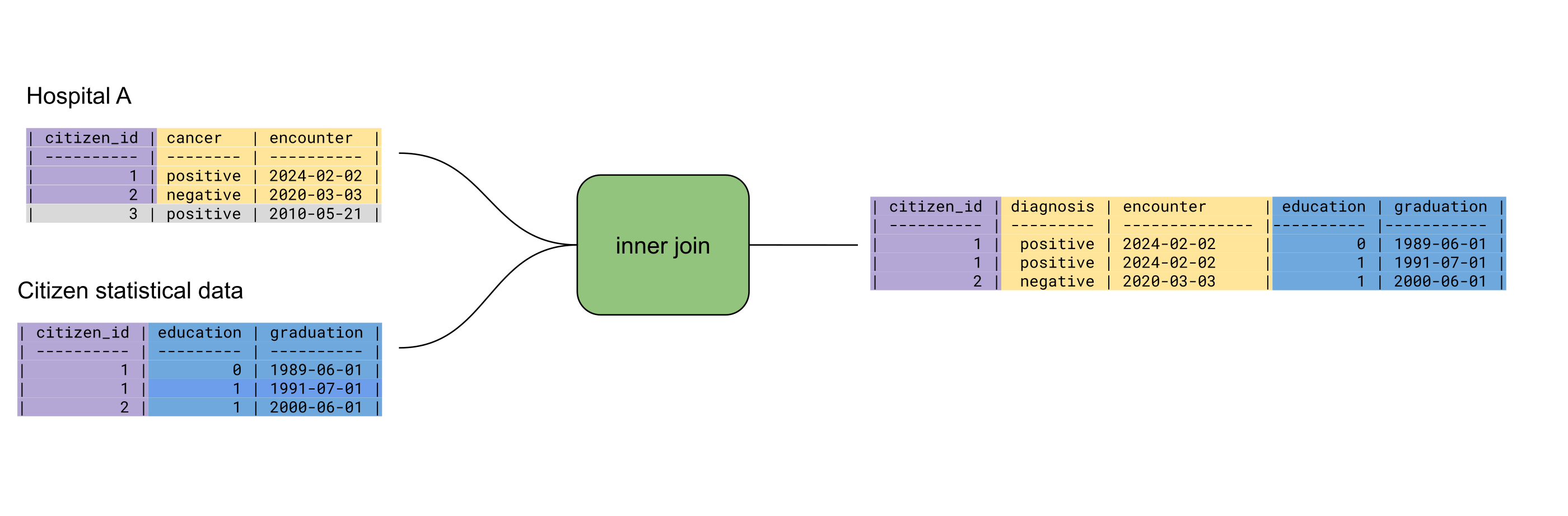
When we perform Inner Join on the tables above, matching on citizen_id, we get the following merged table:
| citizen_id | cancer | encounter | education | graduation |
|---|---|---|---|---|
| 1 | positive | 2024-02-02 | 0 | 1989-06-01 |
| 1 | positive | 2024-02-02 | 1 | 1991-07-01 |
| 2 | negative | 2020-03-03 | 1 | 2000-06-01 |
The merged table includes all columns from the source tables, with the merge column citizen_id appearing only once.
When multiple rows share the same citizen_id value, all matching combinations are included in the result.
If our Hospital A table included several rows with citizen_id = 1, the inner join would contain all possible
combinations of matching rows.
Rows with citizen_id values that do not appear in both tables are excluded from the output (e.g. citizen_id = 3).
Merge expression
Section titled “Merge expression”innerJoin(tableA, tableB, condition)Arguments:
- names of two tables to join
- equality condition, specifying which columns should match
To write the inner join merge expression for the example above, use the following:
innerJoin(HospitalA, Citizen_statistical_data, HospitalA.citizen_id == Citizen_statistical_data.citizen_id)Left Outer Join
Section titled “Left Outer Join”This operation is similar to SQL LEFT OUTER JOIN. It retains all rows from the “left” table (the first table for this
merge operation) and matching rows from the “right” table.
If no match is found, the missing values from the right table are filled with missing.
Consider the tables from the previous example, but now we want to keep all the rows in the merged table, even for the cases where there is no match. Left outer join would yield the following merged table:
| citizen_id | cancer | encounter | education | graduation |
|---|---|---|---|---|
| 1 | positive | 2024-02-02 | 0 | 1989-06-01 |
| 1 | positive | 2024-02-02 | 1 | 1991-07-01 |
| 2 | negative | 2020-03-03 | 1 | 2000-06-01 |
| 3 | positive | 2010-05-21 | missing | missing |
This operation is useful when data from the right table may be missing but the corresponding rows from the left table must still be included in the analysis. For example, it allows identifying patients diagnosed with cancer who lack education data.
Merge expression
Section titled “Merge expression”leftJoin(tableA, tableB, condition)Arguments:
- names of two tables to join
- equality condition, specifying which columns should match
To write the left outer merge expression for the example above, use the following:
leftJoin(HospitalA, Citizen_statistical_data, HospitalA.citizen_id == Citizen_statistical_data.citizen_id)Join operations allow combining datasets containing different information about the same entity. For example,
medical and education data about a patient.
In contrast, the Union operation allows for combining the same information about different entities,
such as patient records from multiple hospitals.
This operation is similar to SQL UNION ALL.
In this example, each hospital maintains medical data for citizens within a specific region, with one hospital per region.
Hospital A
| citizen_id | cancer | encounter |
|---|---|---|
| 1 | positive | 2024-02-02 |
| 2 | negative | 2020-03-03 |
| 3 | positive | 2010-05-21 |
Hospital B
| citizen_id | cancer | encounter |
|---|---|---|
| 10 | negative | 2022-11-02 |
| 11 | positive | 2011-12-01 |
The union of tables for Hospital A and Hospital B is a table containing all rows from both tables
| citizen_id | cancer | encounter |
|---|---|---|
| 1 | positive | 2024-02-02 |
| 2 | negative | 2020-03-03 |
| 3 | positive | 2010-05-21 |
| 10 | negative | 2022-11-02 |
| 11 | positive | 2011-12-01 |
Merge expression
Section titled “Merge expression”union(tableA, tableB)Arguments:
- names of two tables to union
To write the union merge expression for the example above, use the following:
union(HospitalA, HospitalB)Selecting Unique Row
Section titled “Selecting Unique Row”In some cases, the analysis requires a single row per patient. While this can often be achieved within each table, combining two tables using a union may result in multiple rows for the same patient. In our running example, imagine that two different hospitals have records for the same patient because the patient has relocated.
Hospital A
| citizen_id | cancer | encounter |
|---|---|---|
| 1 | positive | 2024-02-02 |
| 2 | negative | 2020-03-03 |
Hospital B
| citizen_id | cancer | encounter |
|---|---|---|
| 2 | negative | 2024-02-02 |
| 3 | negative | 2020-03-03 |
The union of the two tables will contain two rows with citizen_id = 2
| citizen_id | cancer | encounter |
|---|---|---|
| 1 | positive | 2024-02-02 |
| 2 | negative | 2020-03-03 |
| 2 | negative | 2024-02-02 |
| 3 | negative | 2020-03-03 |
However, suppose we want to include only the first encounter of the patient.
The unique row operation achieves this by retaining only the row that meets a specific selection criterion, such as the
earliest encounter date in this example.
After applying Unique row we get
| citizen_id | cancer | encounter |
|---|---|---|
| 1 | positive | 2024-02-02 |
| 2 | negative | 2020-03-03 |
| 3 | negative | 2020-03-03 |
Merge expression
Section titled “Merge expression”uniqueRow(table, operation, groupByVariable, selectVariable)Arguments:
- the name of a table
- an operation used to select the unique row from each group; can be
MINorMAX - a column used to group rows
- a column to apply the selection operation
To write the unique row merge expression for the example above, use the following:
uniqueRow(union(HospitalA, HospitalB), MIN, citizen_id, encounter)Combine Data in Multiple Ways
Section titled “Combine Data in Multiple Ways”The merge operations described above can be combined in various ways to produce data suitable for further computation. The analyst can define a merge tree that specifies how merge operations pass their output further to other merge operations.
For example, if Hospital A and Hospital B have patient records and the analyst wants to combine them with education
data, the analyst first performs a union of the hospital datasets.
This may result in duplicated records for a patient who received treatment at both hospitals.
To remove duplicates, the analyst can use the unique row operation, selecting
the row with the minimum encounter date. The data can then be joined with the education data.
